Try VaultGuard Backup Free — 14 Days, No Credit Card
Tell me where to send your license key, try it out, and if you decide it's not for you, the backups you made still work. They're standard Windows system images — Windows can restore them whether VaultGuard Backup is installed or not, whether you ever pay me or not.
Try VaultGuard Backup free for 14 days. No credit card, no catch. It images your entire Windows PC, checks every backup, and once a week pulls real files back out of the backup to prove they restore. It keeps a second copy on another drive or in a sync folder you already have. Full features, no commitment, including the Technician tab for small businesses with more than one computer, and the Getting Started page walks you through the first backup in about five minutes.
Getting Your Trial
What happens next:
Upon submission, you'll get an email (make sure to check your spam/junk folder) within a few minutes containing your license key and the download link.
Run the .exe, which creates a desktop shortcut, paste your license key on the activation screen, and follow the Getting Started page: pick the backup drive, pick the days, make a recovery drive, save, and run the first backup chain.
Use VaultGuard for 14 days, no charge. Run real backups, watch the restore test run, open the files it brings back, and decide whether it does what this page says it does.
If you want to keep going, subscribe through the VaultGuard Backup store. Your key stays the same and your configuration carries forward on every computer you set up; nothing to reinstall or re-enter.
If it's not the right fit, do nothing. The trial expires automatically. No surprise charges, no awkward sales call.
VaultGuard Backup is Windows software. Windows 11 recommended; Windows 10 still works but no longer receives security updates from Microsoft. You should sign up here from the device you intend Backup for, but you can fill out the form and submit anytime. If you do this on anything other than a Windows PC, come back and click HERE to download the file. After you submit, your license key will arrive by email.
I read every signup myself. I'll use your email to deliver your license key and to send you a few short messages during your trial — that's it. Your information won't be shared, sold, or used for marketing campaigns. The full data inventory is in the Privacy Policy.
By submitting, you agree to: By starting your free trial, you agree to the End User License Agreement and the Terms of Service, and acknowledge the Privacy Policy.
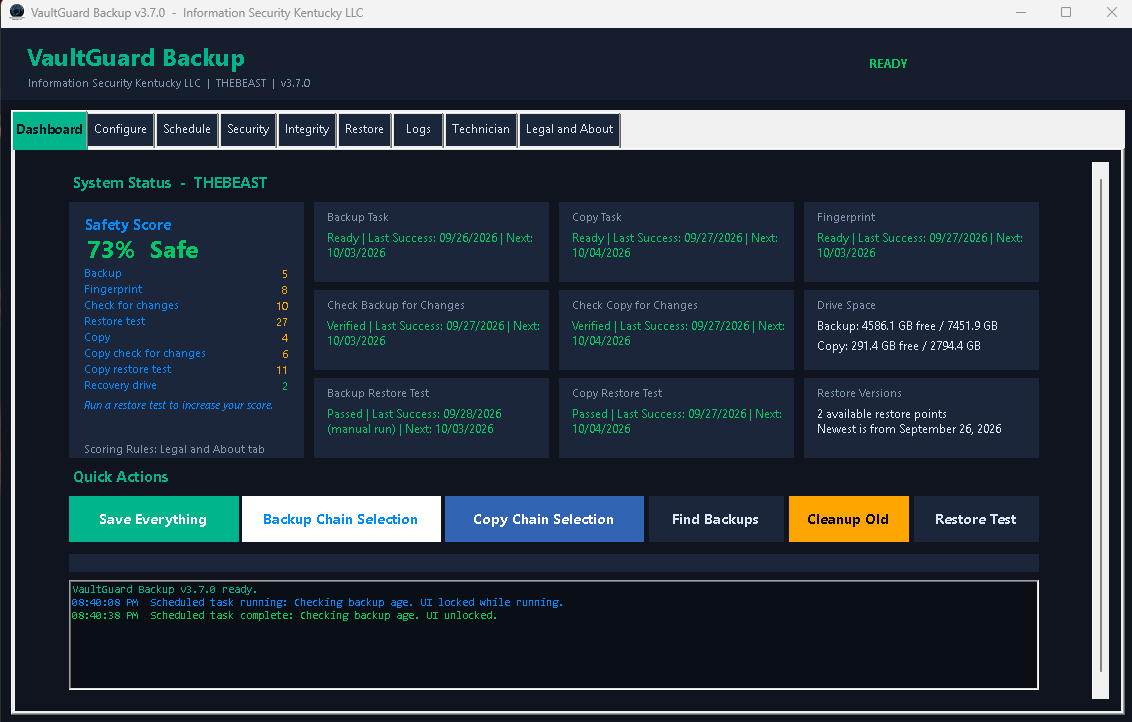
Screenshot of the VaultGuard Backup dashboard: nine task cards for the backup and copy chains, each showing its state and last success, and a Safety Score card reading 73% Protected with the checklist of what's proven and showing the score decay as the tasks will run the next day.
What's In The “Box”
Want the full rundown before you start? Here's everything VaultGuard Backup can do.
All features included, no premium tier holding back the security features that actually matter
Hardware-bound license: one trial key covers up to five computers, each tied to its own hardware
A real restore test every week, with a plain-language report and the restored files left for you to open
A Safety Score that tells you how much of your recovery is actually proven
A fingerprint of every backup and copy, checked before any restore
A recovery drive you build from inside the app
Your second copy goes where you choose: another drive, a network share, or any cloud provider's sync folder
Failure emails through a managed relay, so you don't need to configure anything
Direct support: when you email customer service, I answer
The Technician tab, included in the trial: install the same key on up to five computers, make one of them the master, and watch all of them from one screen. Best tried only if you have more than one computer to protect.
Common Questions About The Trial
Will VaultGuard charge me at the end of the trial? No. There's no card on file. If you want to subscribe at the end of your trial, you do it deliberately by visiting the product page and signing up.
What happens to my backups if I don't subscribe? Your backups remain on your storage media. They're standard Windows system images, restorable on any Windows machine with or without VaultGuard installed. When the trial ends, VaultGuard stops making new backups but doesn't delete anything, and restoring from the backups you already made keeps working inside the app. Subscribe later and everything picks up where it left off.
Can I try the Technician tab? Yes. Every trial includes it. Put the same trial key on up to five computers, claim one of them as the master machine, and the Technician tab on that computer shows every machine's protection score, lets you export a report for each one, and lets you remove a machine from the license. It is the same tab a Technician license gets. After the trial, the Technician tab stays only on a Technician license. If you subscribe as a Technician, your key, your fleet, and your master machine all carry straight over. An Individual license covers one computer, so remove the others from the Technician tab before you subscribe to that plan.
One honest caution: if you expect to end up on an Individual license, keep the trial on one computer. An Individual license covers one machine, and a key that still has several machines on it when the plan changes will refuse to run on all of them until the extras are removed. Trying the Technician tab is for people who have more than one computer to protect and are weighing the Technician plan.
Can I move my trial to a different machine? A trial key works on up to five computers at once, each tied to its own hardware. If you want to use it on a sixth, remove one of the others from the Technician tab on your master machine first. If you need a fresh start for any other reason, email customer service and I'll work out a fresh trial.
Can I extend the trial? By default, no — 14 days is the trial length. If you have a legitimate reason (you didn't get to test it during the window, you're evaluating for a larger deployment, you ran into an issue we couldn't resolve in time), email customer service and I'll usually accommodate.
What if VaultGuard doesn't work for me? You walk away. There's nothing to cancel because there was no charge. I'd appreciate a quick email telling me what didn't work, but you're not obligated to provide one.