What to Do When Your Email Gets Hacked
What to do when your email gets hacked
Someone's in your email. Maybe a client called to ask about a message you never sent, maybe your password stopped working, maybe you got a login alert from a country you've never been to.
If it's your business account, this is worse than it looks, and I'll get to why. But the first thing to know is the part almost nobody tells you — and it's the reason people "fix" this and get hacked again a week later:
Changing your password usually doesn't kick them out.
That sounds wrong. It isn't. And once you understand why, the rest of this makes sense.
Why the password isn't the problem
When you log into your email, the service hands your browser a session — that's what keeps you logged in so you're not typing your password every time you check your mail. That session is issued after you log in, and it lives on its own.
So when the attacker logged in with your stolen password, they got a session too. On most services, changing your password doesn't end their session. They just stay logged in and watch you do it.
This is also why two-factor authentication didn't save you. A stolen password can be stopped by a second factor. A stolen session has already been through the second factor. There's nothing left to stop.
And that's before we get to the ways they've probably set up to come back later. More on that in a minute — it's the part that matters most.
What it usually looks like on the way in
Here's a real one that landed in my inbox this month. I'm using it because it's a good example of the shape, and because the shape is the whole lesson.
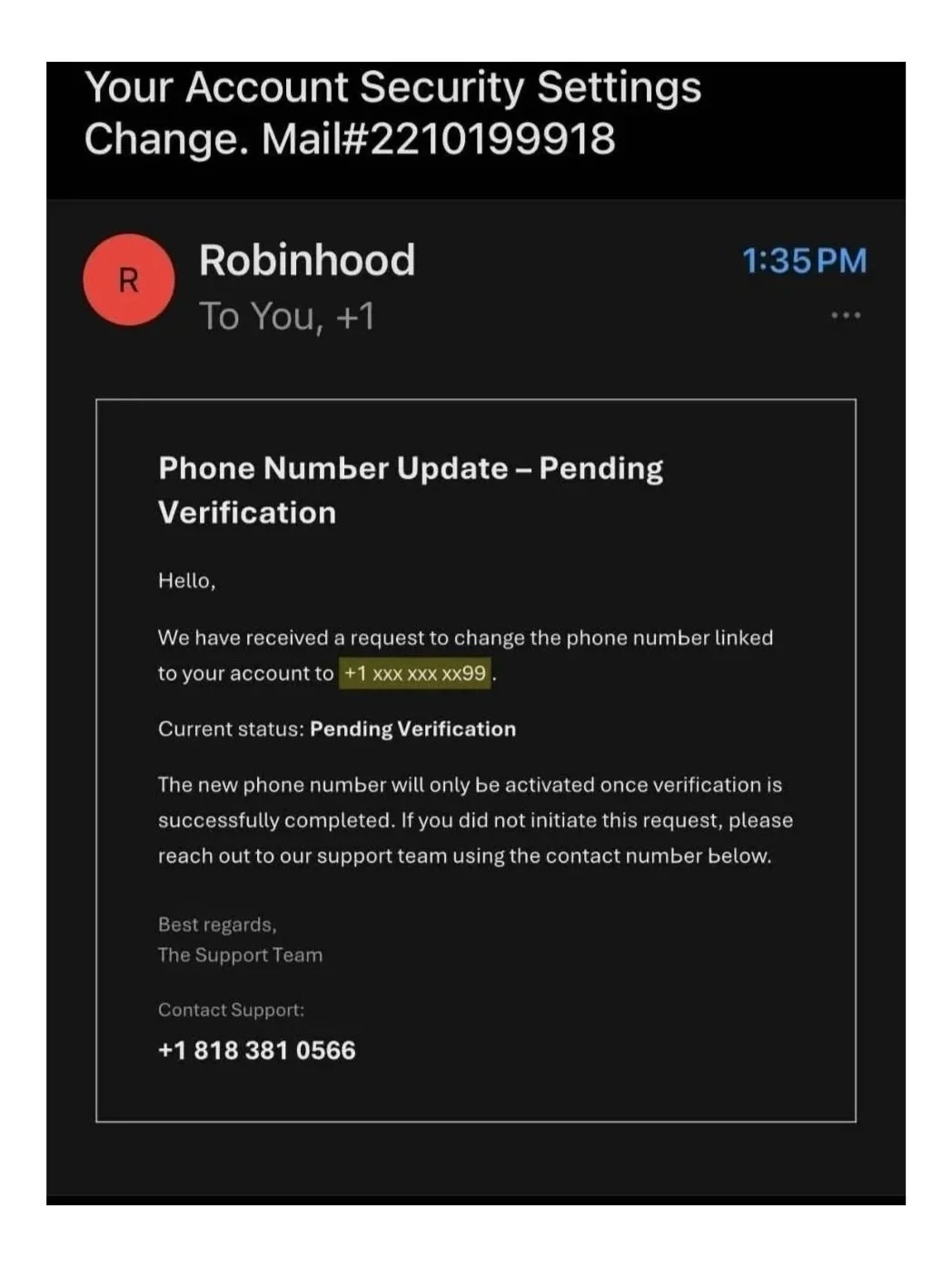
At a glance: Robinhood, someone's trying to change the phone number on the account, and there's a support number right there if it wasn't you. That's alarming in exactly the way it's supposed to be. If you've got money in that account, your hand is already moving toward the phone.
Then you tap the sender name.
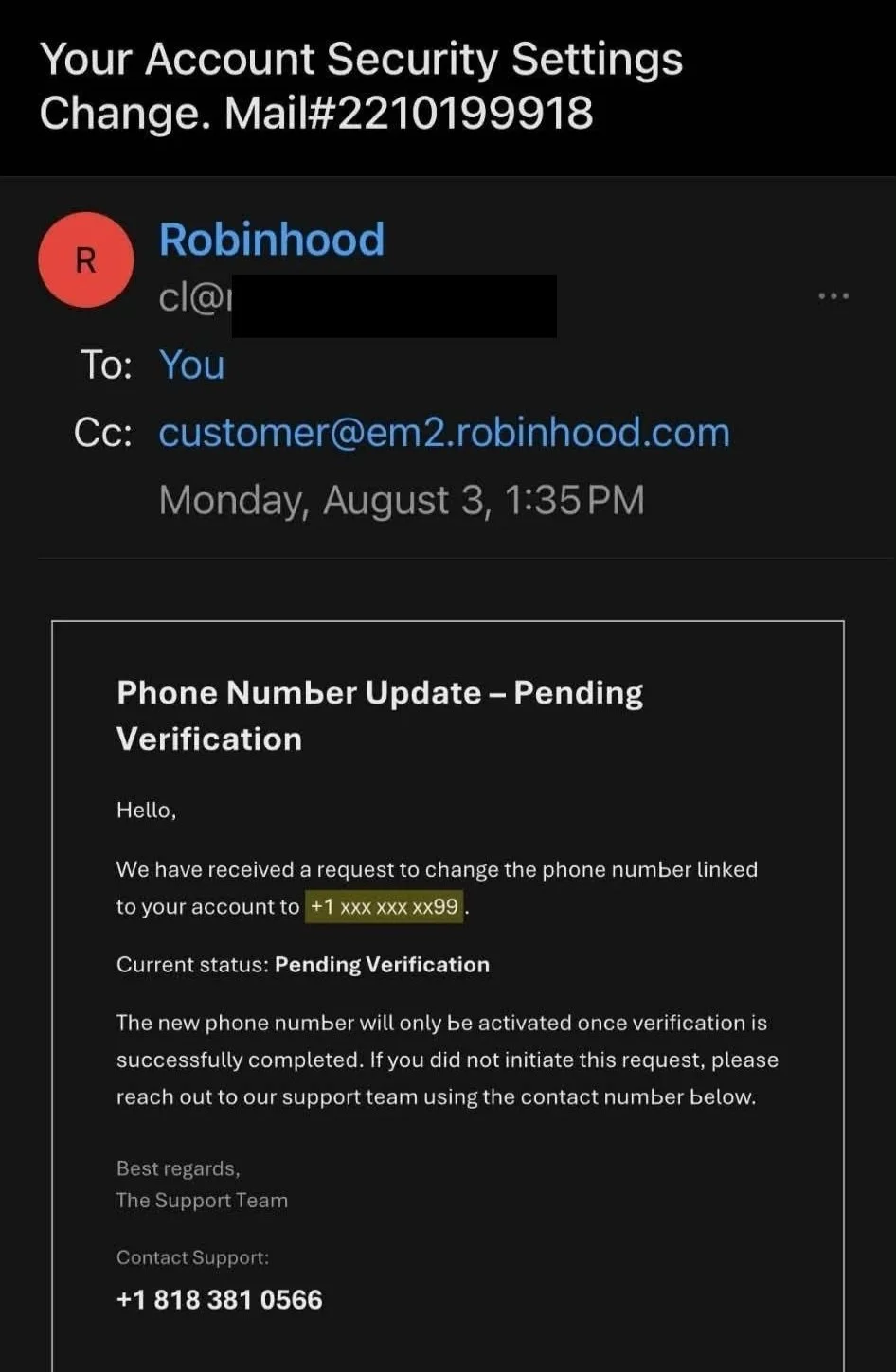
It isn't Robinhood. It's a random domain with nothing to do with them.
Three things worth pulling out of that, because they show up over and over.
The sender name and the sender address are two different things. Your phone shows you the name, because that's what fits on the screen, and anybody can type anything there. The address underneath is the part that's hard to fake — and it's the part that's hidden by default.
There's no link in this email, and I think that's on purpose. We've all been told a hundred times not to click links, so they took the links out. The entire scam is a phone number. You call, someone friendly and helpful answers, and they walk you into handing over the account yourself. No malware, no clever hacking, just a conversation.
They put a real-looking company address in the Cc line. That's set dressing. It makes the header look right if you only glance at it. Real companies don't copy you on your own security alert.
Swap Robinhood for something a business actually uses and you've got the version that lands in a work inbox: your Microsoft 365 password expires today, your invoice payment failed, a shared file is waiting for you. Same three tricks, different logo.
What I do, and what I'd tell anyone on my crew to do: if an email says something is wrong with an account, don't touch anything in the email. Close it. Open the app or type the address yourself and go look. If something's actually wrong, it'll be in there. If it isn't, you just saved yourself a very expensive phone call.
And don't call the number to waste their time. Answering marks you as a live one, and you'll hear from them again.
Step 1: Get to a device you trust
Do not do any of this on the computer or phone you think is compromised.
If there's anything nasty on that machine reading your keystrokes, then changing your password on it just hands the attacker your new one, live, while you're feeling relieved.
Use a different device. A partner's laptop, a work computer, a phone that isn't the one in question, a library machine. It doesn't have to be fancy. It has to be clean.
If you're not sure how they got in, assume the machine is the problem until you've ruled it out.
Step 2: Get back in, and lock the door
From that clean device:
Change your password. Long, unique, not a version of the old one.
Turn on two-factor authentication if it isn't already. An authenticator app is better than text messages.
Sign out of all other sessions. This is the step that actually evicts them, and it's the one people skip.
That third one has different names depending on your provider:
Gmail / Google: go to your Google Account → Security → Your devices → sign out anything you don't recognize. myaccount.google.com/security
Outlook / Microsoft: account.microsoft.com/security → review sign-in activity and devices.
Apple: appleid.apple.com → your devices list → remove anything that isn't yours.
Until you do this, everything else is decoration.
Step 3: The part everyone skips — find what they left behind
An attacker who's been in your mailbox knows they might get caught. So they leave themselves a way back in. This is the most important section on this page, because none of it cares that you changed your password.
Check every one of these:
Forwarding rules. The classic. They set your email to silently forward a copy of everything to an address they control. You change your password, feel safe, and they keep reading your mail forever. Gmail: Settings → Forwarding and POP/IMAP. Outlook: Settings → Mail → Forwarding.
Filters and rules. Sneakier. A rule that automatically deletes any email containing "password reset" or "security alert" means you never see the warnings. Some people find rules that hide entire conversations. Gmail: Settings → Filters and Blocked Addresses. Outlook: Settings → Mail → Rules.
App passwords. These exist so older mail programs can connect without two-factor. Which is exactly why attackers create them — an app password bypasses your 2FA entirely, and on some services it survives a password change. Delete any you don't recognize. Gmail: myaccount.google.com/apppasswords.
Connected apps. Anything you've ever granted access to your account. If they got you to approve something, it has standing access that doesn't care about your password. Remove anything unfamiliar — and remove the permission, not just the current connection. Gmail: Google Account → Security → "Your connections to third-party apps."
Your recovery email and phone number. If they changed these to an address they own, they can simply reset your password back and take the account again. Check both. This one bites people twice.
Security questions. Same idea, older mechanism. If they've been changed, change them back.
Aliases and "send mail as." These let them send email as you even after you've locked them out of the inbox. Gmail: Settings → Accounts and Import.
Delegated access. Gmail and Outlook can both give another account permission to read your mailbox. Almost nobody checks this one, and it's about as bad as it gets. Gmail: Settings → Accounts and Import → "Grant access to your account."
A password change with a forwarding rule still in place means they still have everything — and now you think you're safe. That's worse than doing nothing.
Step 4: Everything downstream
Your email is the master key. Every account you own resets its password through it. So once the mailbox is genuinely yours again:
Anything financial — bank, PayPal, anything with a card in it
Anything that resets through that email — which is most things
Anything using the same password, or a close cousin of it
If the password on your email was used anywhere else, treat every one of those accounts as compromised. That's not being paranoid. That's how they got in, most of the time — an old breach at some site you forgot about, and the same password.
Check haveibeenpwned.com to see which breaches your address has turned up in. It's free and it's run by a well-known security researcher, not a scam.
If it's a business account, four more things
Everything above still applies. These are the parts that only bite businesses, and they're the reason a work mailbox is a bigger problem than a personal one.
Your clients and vendors trust email from you. That's the actual asset that got stolen. Anyone in your contacts is now reachable by someone wearing your name, and they have every reason to believe it. Tell your people directly — by phone, not by email — that anything unusual from your address this week should be verified before they act on it.
Watch for a payment redirect. This is the one that costs real money. Somebody sitting quietly in a business mailbox waits for an invoice to go out, then follows up "from you" saying the bank details have changed. If you've sent or received an invoice recently, call the other party and confirm the account information out loud, using a phone number you already had — not one from an email.
Check every mailbox, not just yours. If one account on your domain was reached, the rest are worth checking the same way. Same forwarding rules, same app passwords, same connected apps. Attackers move sideways.
If you hold other people's records, this may be more than an inconvenience. Patient information, client files, anything covered by a rule you signed — there may be a notification obligation attached, with a clock on it. I'm not a lawyer and I won't pretend to be. But this is the moment to find out rather than the moment to assume, and the answer depends on what was in the mailbox.
Step 5: How do you know they're actually gone?
Not by feeling better. By checking:
Password changed, from a clean device
Two-factor on
All other sessions signed out
No forwarding rules, no strange filters
No app passwords you didn't create
No connected apps you don't recognize
Recovery email and phone are yours
No delegated access, no unexpected aliases
Sign-in history shows only you
That list is the actual answer to "am I safe now." Anything less is hoping.
What you can't undo — and you should know this now
I'd rather tell you than let you find out:
Anything they read, they read. Assume everything in that mailbox has been seen.
Anything they sent, they sent. You can warn people, but you can't unsend it.
If they took data, it's gone. You're closing the door, not un-taking what's already out.
Money that moved is the bank's problem, and it's urgent. That call happens before anything on this page.
The goal here isn't to undo it. It's to make sure today is the last day of it.
If it was someone you know
One thing worth saying plainly, because it comes up more than people think.
If you suspect the person in your account is a partner, an ex, a family member, or someone with physical access to your devices — stop, and don't change anything yet. Locking them out tells them instantly that they've lost access, and that can make a bad situation dangerous. There may also be evidence that matters later.
That's a different situation with different rules, and it deserves someone who does safety planning. In the US: the National Domestic Violence Hotline, 1-800-799-7233, or text START to 88788. Call from a device the person doesn't have access to.
If you'd rather not do this alone
None of the above requires a professional. It requires an hour, a clean device, and the patience to check all of it instead of stopping at the password. Most people stop at the password.
But if you're staring at this list at 11pm and you just want someone to sort it out — that's what I do. I'm David Martin, I run Information Security Kentucky out of Hardin County, and a good chunk of my work is exactly this: someone got in, and you need it locked back down and you need to know they're out. No jargon, no lecture about how it happened. Reach out and we'll go through it.
And if it turns out the way they got in was something on your computer, that's a different conversation — one about whether your machine is clean and whether your files are actually recoverable. One thing at a time, though. Get the email back first.
If you don’t know what a backup actually is, start here to find out.
David Martin
Information Security Kentucky LLC
Protect. Prevent. Prepare.
Hardin County, Kentucky